Omarchy Remote: Reach Any Service on Your Omarchy Machine from Anywhere

omarchy-remote turns any service on your Omarchy machine into a URL you can open from anywhere. A local model API, a web app you are building, or the Hyprland desktop itself: one command publishes it, and you pick who gets in. You don't need containers, Kubernetes, a public IP or open ports.
omarchy-remote expose screen 6080                 # private: only your own devices
omarchy-remote expose ai 11434 --auth bearer      # public: an API key, checked at Cloudflare's edge
omarchy-remote expose app 3000 --auth login --allow friend@example.com   # public: email-code login
Here is the whole thing in under two minutes. It shows the desktop opening from a laptop over Tailscale, a friend signing in through a login page, a local model API answering an OpenAI client through Cloudflare, and the Omarchy bar plugin.
Pick your path
Every service stays on 127.0.0.1. You only choose who can reach it:
| You want to… | Run | Who gets in |
|---|---|---|
| Reach it from your own laptop or phone | omarchy-remote expose <name> <port> | Only devices in your tailnet (your private Tailscale network) |
| Let specific people in from a browser | omarchy-remote expose <name> <port> --auth login --allow friend@example.com | The emails you list, after a one-time code (Cloudflare or Pangolin) |
| Let a program or an OpenAI-compatible client call it | omarchy-remote expose <name> <port> --auth bearer | Anyone with the API key, checked at Cloudflare's edge |
Scripts can also use --auth token or --auth password, and --auth none makes a page fully public. Under the hood explains each option.
Install
On the Omarchy machine, as your normal user:
curl -fsSL https://raw.githubusercontent.com/second-state/omarchy-remote/main/install.sh | bash
This clones the tool, links omarchy-remote into ~/.local/bin, installs wayvnc, downloads noVNC and starts the two desktop services. Nothing is reachable from outside until you run expose. To upgrade later, run the same command again.
Then add the bar plugin:
omarchy plugin add https://github.com/second-state/omarchy-remote-plugin --enable
One-time provider setup
Set up only the providers you plan to use:
- Tailscale (private URLs): install it and log in. The first
exposemay print a link to turn on HTTPS for your tailnet;sudo tailscale set --operator=$USERletsexposerun without sudo. - Cloudflare (public URLs): create an API token and run
omarchy-remote cloudflare login. Forloginandtoken, also turn on Zero Trust (free for up to 50 users). - Pangolin (public URLs): add the machine as a site, delegate a subdomain to Pangolin, then run
omarchy-remote pangolin connectandomarchy-remote pangolin login.
The README lists the exact token permissions and every step. Secrets are typed at a hidden prompt and stored in ~/.config/omarchy-remote/ with mode 0600; they never appear on the command line.
Everyday use
omarchy-remote expose <name> <port>                    # private URL via Tailscale
omarchy-remote expose <name> <port> --auth <mode>      # public URL via Cloudflare or Pangolin
omarchy-remote list                                    # everything this machine exposes
omarchy-remote unexpose <name>
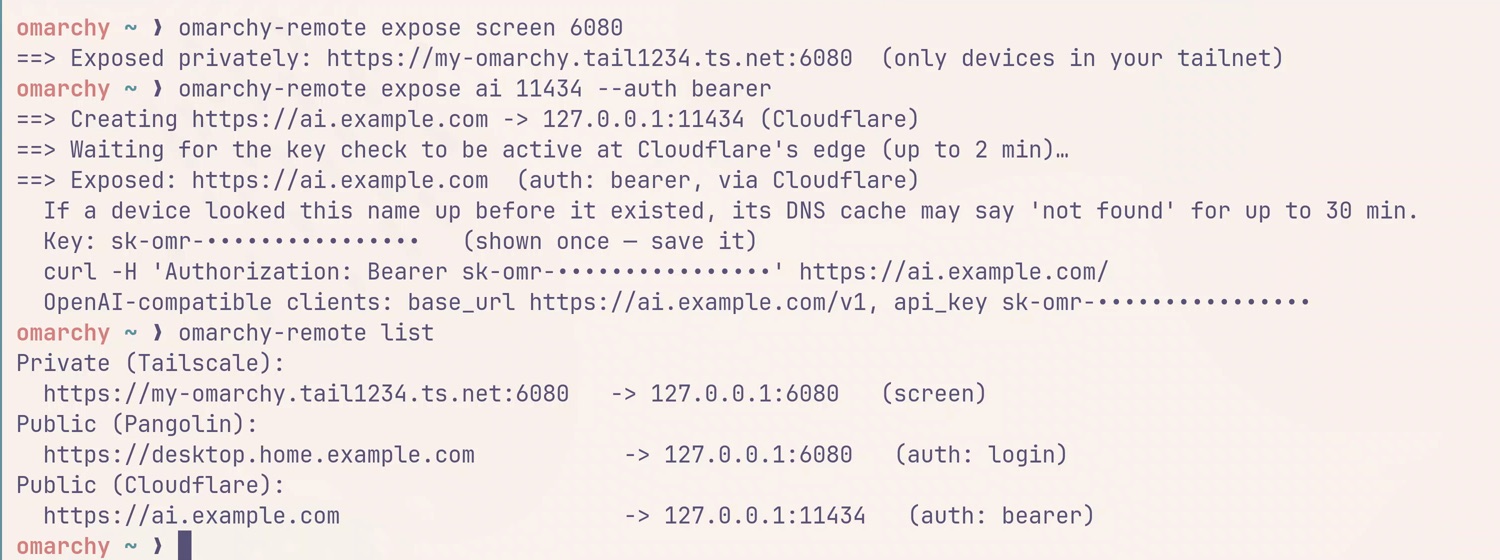
A few things worth knowing:
- Pick the provider per service.
--via cloudflare|pangolinchooses the public path, andomarchy-remote config set public <provider>changes the default.beareralways goes through Cloudflare andpasswordthrough Pangolin. - Credentials are shown once. Generated passwords, tokens and keys are printed a single time. To rotate one,
unexposeandexposeagain. - Use the private URL for yourself. Tailscale is a direct connection. A public tunnel adds a relay hop, which you'll feel on the remote desktop.
- The desktop is the real desktop. Anyone who signs in to it has full control of your session, and every remote viewer shares the same screen.
- Cloudflare free plan limits. Each
bearerservice uses one WAF custom rule (a Cloudflare firewall rule), and the free plan has five per zone. Anyone with access to your Cloudflare dashboard can read the keys in those rules. Theloginandtokenmodes don't use WAF rules.
The Omarchy bar plugin
Once you have a few services out, you'll want to see them without opening a terminal. The Omarchy Remote plugin adds an icon to the Omarchy bar. Its panel lists every exposed service with its local port, public URL, provider and auth mode, plus whether the desktop service is running. Click a row (or press Enter) to copy the URL, press O to open it, or press R to refresh.
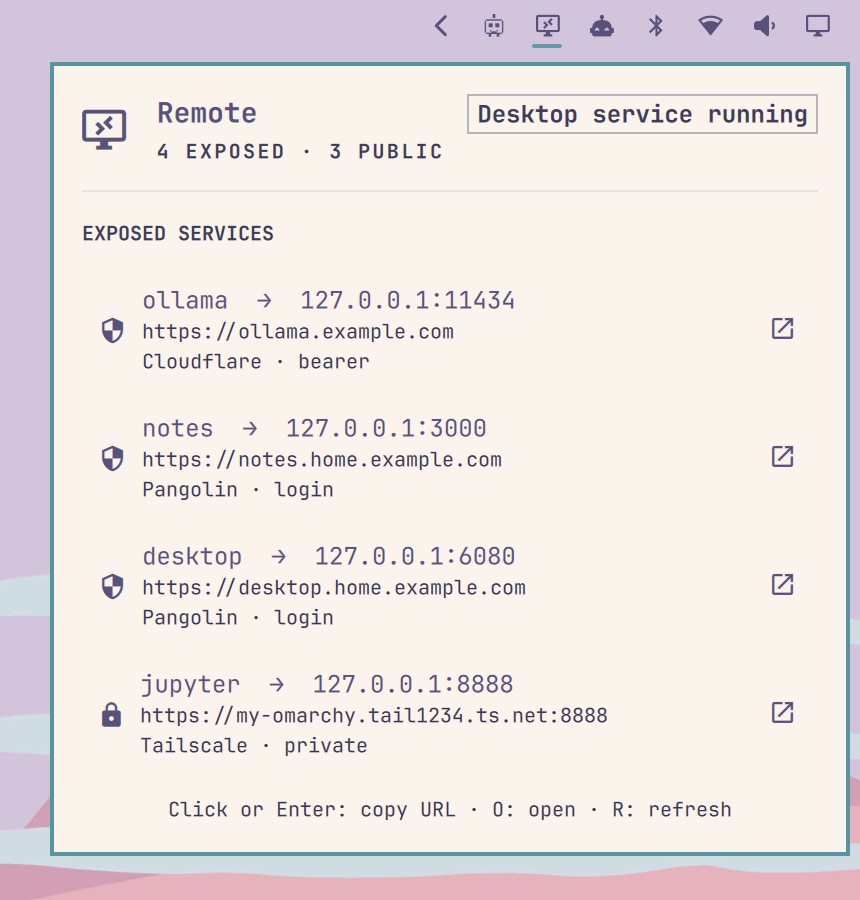
The plugin keeps no state of its own. It runs omarchy-remote list --json and renders the result, so the CLI and the bar always agree.
Why we built it
An Omarchy machine on your desk is already a good server: it has a GPU for local models, your dev environment and your files. What it lacks is a safe way to reach it once you leave the room. The usual answers are either too little (an SSH tunnel per port, re-typed every time) or too much (a container platform with its own user system, just to share one web page).
omarchy-remote takes the small path. Your services keep running however they already run: a binary, a script or a container, that's your call. expose only needs a port on 127.0.0.1. The tool does the plumbing around that port: a URL, a TLS certificate, a tunnel and an auth check. It also tracks what is exposed so you can list and remove it later.
Under the hood

Every service stays bound to localhost. What changes is the path a request takes to reach it, and you choose that path per service.
Private by default: Tailscale
Without --auth, expose uses Tailscale Serve. Running omarchy-remote expose app 3000 asks Tailscale to serve https://<machine>.<tailnet>.ts.net:3000 and proxy it to 127.0.0.1:3000. Only devices signed in to your tailnet (your private Tailscale network) can open it. Traffic goes peer-to-peer and Tailscale issues the certificate. omarchy-remote keeps a small name-to-port map, so unexpose app knows exactly which serve entry to turn off.
This is the right mode for your own laptop and phone: it is free for personal use, needs no domain, and is the fastest path to the remote desktop.
Public: Cloudflare or Pangolin, your choice
Adding --auth makes the URL public. Both public providers reach the machine through an outbound tunnel, so nothing on your network has to accept inbound connections. You choose the provider per service with --via cloudflare|pangolin. The default is Cloudflare, since many people already have a domain there. If you only set up Pangolin, it uses Pangolin instead.
--auth | For | Cloudflare | Pangolin |
|---|---|---|---|
login | people, in a browser | ✓ Cloudflare Access, email one-time code | ✓ Pangolin login, email one-time code |
token | scripts | ✓ Access service token | ✓ Pangolin access token |
bearer | OpenAI-compatible clients | ✓ key checked by a WAF rule | — |
password | scripts and browsers | — | ✓ HTTP Basic |
none | everyone (needs --yes-public) | ✓ | ✓ |
Every password, token or key is generated for you and shown once.
Cloudflare: Tunnel, Access and the edge
On first use, omarchy-remote creates one Cloudflare Tunnel named omarchy-remote-<host> and runs cloudflared as the systemd user unit omarchy-remote-tunnel. Each expose adds an ingress rule (the tunnel's routing entry) for 127.0.0.1:<port> and a proxied DNS record <name>.<your zone>. The auth check depends on the mode:
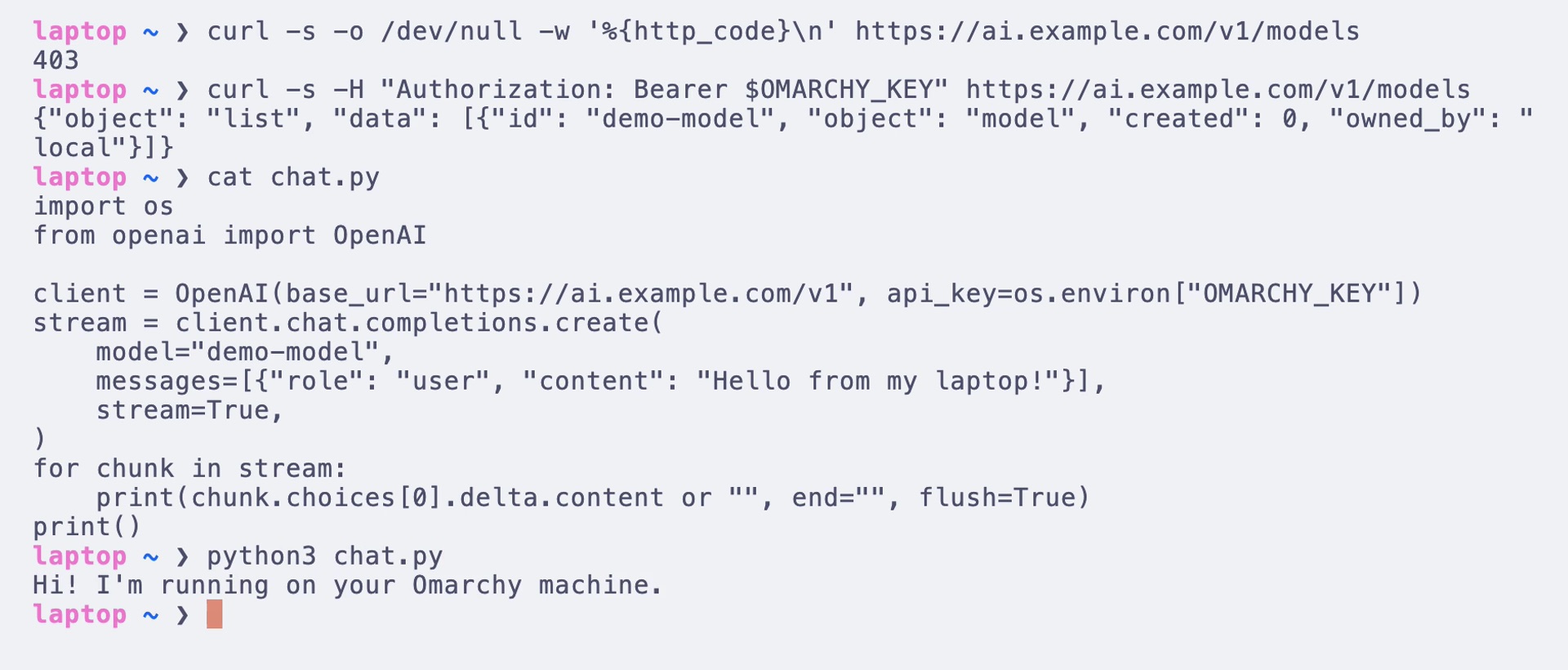
loginandtokenuse Cloudflare Access. omarchy-remote creates one Access application per service. It is guarded by a policy that allows the emails you list with--allow(they sign in with a one-time code sent by email) or a fresh service token (scripts sendCF-Access-Client-IdandCF-Access-Client-Secret). The application exists before the DNS record does, so the hostname is never reachable without the login.beareris for model APIs. OpenAI-compatible clients sendAuthorization: Bearer <key>and expect streaming to just work. omarchy-remote adds a WAF custom rule (a Cloudflare firewall rule) that blocks any request to that hostname without the right key. The check happens at Cloudflare's edge, so requests without the key never reach your machine.
Either way, expose waits until a request without credentials is actually refused before it reports success, because rules take 10 to 30 seconds to propagate. unexpose removes the record, the ingress rule and the Access application, policy, token or WAF rule.
A bearer key works like any hosted API key:
Pangolin: an identity-aware tunnel
Pangolin is the other public option, and the one to use for password. The machine joins your Pangolin organization as a site. For each expose, omarchy-remote calls the Pangolin Integration API: it creates a resource at <name>.<your delegated domain>, points it at 127.0.0.1:<port> and switches on the auth mode. With login, members of your Pangolin organization sign in with their account, and the emails on your --allow list get a one-time code. You delegate one subdomain to Pangolin once (point its NS records at Pangolin), for example home.example.com. After that, every new service gets its own hostname and certificate in about 30 seconds.
The desktop is just another service
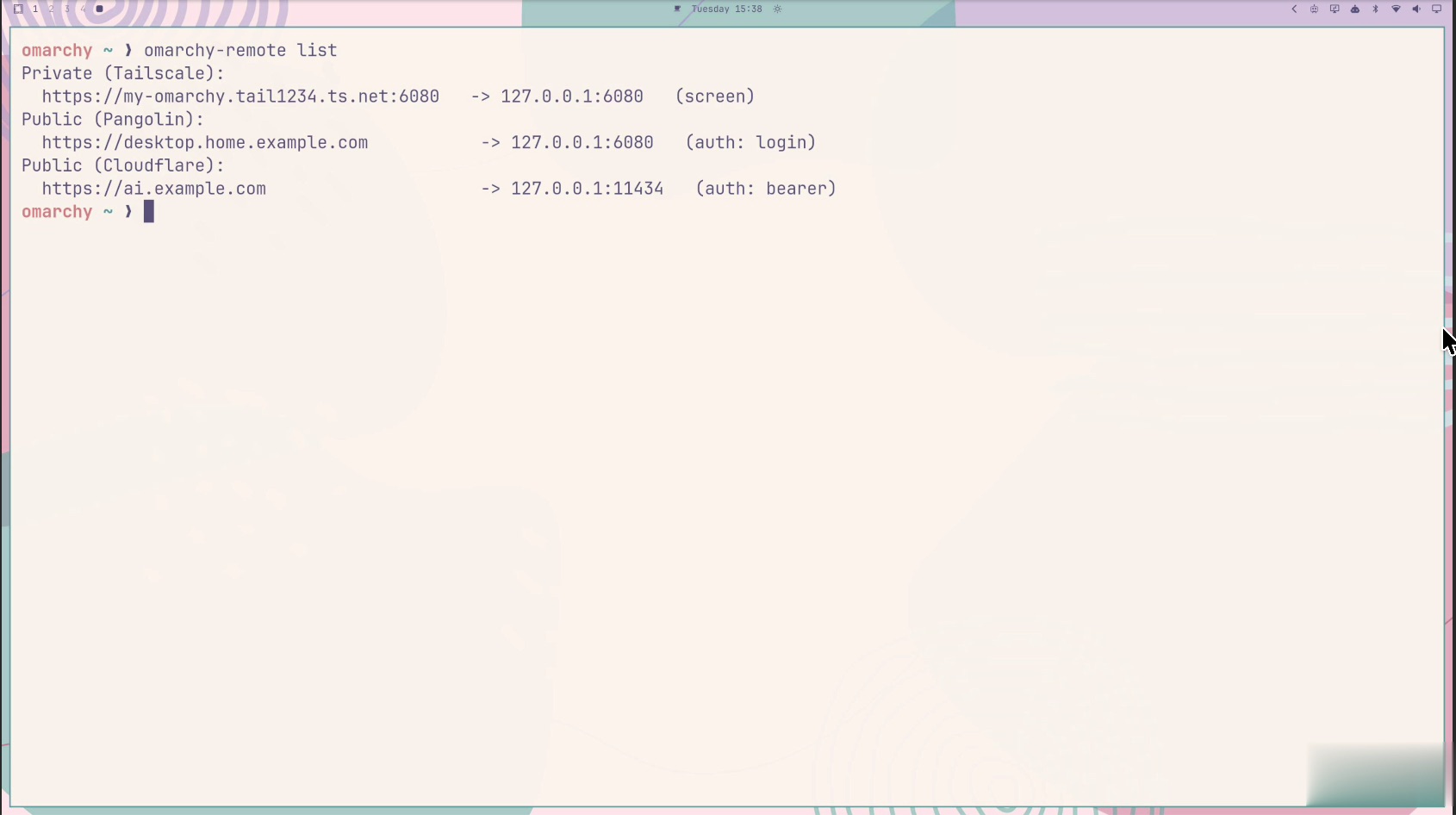
The installer also sets up a browser remote desktop, so there is something useful to expose from day one. wayvnc captures the Hyprland session on 127.0.0.1:5900, and noVNC serves it as a web page on 127.0.0.1:6080. Both run as systemd user units that start with your graphical session. If no monitor is attached, the desktop service tries to create a virtual one. To omarchy-remote, port 6080 is a port like any other:
What's next
omarchy-remote is the first piece of a larger idea: a lightweight personal cloud on top of Omarchy, with no container orchestration and no heavyweight user system. It's your own computer, reachable from anywhere. Next on the list:
- a dedicated 1080p virtual display for remote sessions;
- a low-latency mode built on Sunshine and Moonlight;
- proxying other devices on your LAN through the same commands.
The CLI and the plugin are open source under the MIT license. Try them, open an issue, or send a pull request: