VibeKeys is the physical keyboard for vibe coding.
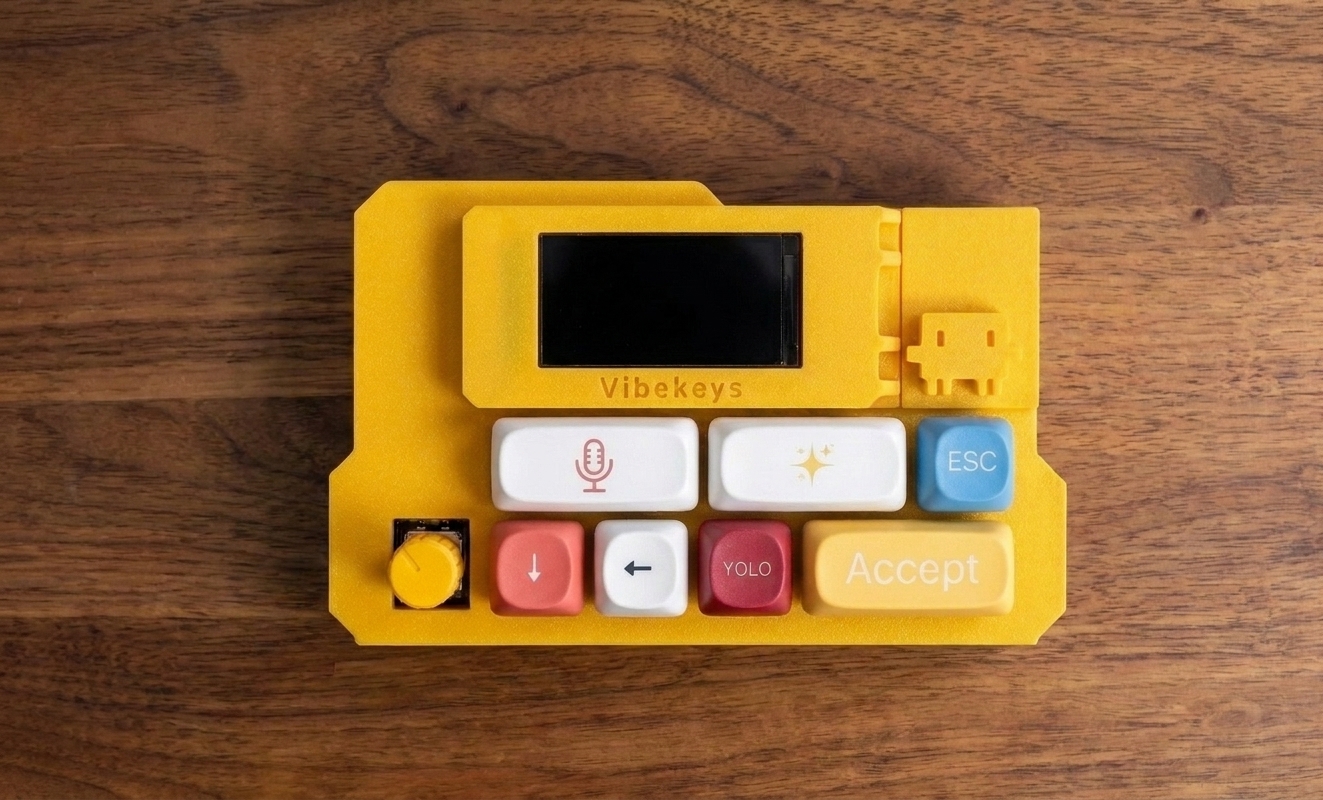
VibeKeys is a dedicated AI coding keypad and keyboard-style control surface for Claude Code, Cursor, Codex, Gemini CLI, and other coding agents.
AI coding changed the workflow. The keyboard did not.
A vibe coding keyboard is hardware built around AI-assisted development. Instead of memorizing shortcuts or typing the same commands, you keep repeated agent actions within reach.
Developers also describe this category as an AI coding keyboard, Claude Code keyboard, AI coding keypad, or physical keyboard for vibe coding.
Control the agent loop
Accept, reject, retry, stop, scroll, approve, and continue no longer have to be hidden behind ad hoc shortcuts.
Voice input is always one key away
Dedicated voice controls make it easier to talk through architecture, refactors, bugs, and changes without reaching for a laptop shortcut.
Make AI coding tactile
Physical keys and a knob give feedback. You can move through long agent output without breaking concentration.
Works beside your main keyboard
VibeKeys does not replace your normal keyboard. It gives AI coding workflows their own control surface.
Designed around AI coding actions, not generic shortcuts.
A Stream Deck or macro pad can launch apps. VibeKeys is shaped around the actions developers repeat inside Claude Code, Cursor, Codex, and terminal-first agent workflows.
The controls vibe coders reach for all day.
The point is not more keys. The point is giving the AI coding loop a physical interface you can use without thinking about it.
Approve changes
Confirm suggestions and move forward without hunting for the right key combo.
Iterate faster
Ask the agent to try again, revise, or continue the loop with a dedicated control.
Keep context manageable
Trigger compact or summarize actions in long Claude Code, Codex, and terminal-agent sessions.
Shift modes deliberately
Make high-trust mode changes explicit with a physical key you know you pressed.
Speak the prompt
Keep your thought process intact when describing architecture, bugs, and product behavior.
Navigate output
Scroll through long responses, diffs, and menus with tactile precision.
Stay in sync
VibeKeys Max adds a screen so you can see what your agent is doing at a glance.
Three models for different AI coding setups.
Start with a wired keypad, go wireless with Plus, or move up to Max for a desk console with status, voice, and remote control.
VibeKeys Pro
A compact wired AI coding keypad with 6 programmable keys and a rotary knob.
VibeKeys Plus
The Pro workflow with Bluetooth, Wi-Fi, and a cleaner wireless desk setup.
VibeKeys Max
A standalone AI coding console with a status screen, built-in mic, remote mode, open-source firmware, and custom printed case options.
Common questions about vibe coding keyboards.
Is VibeKeys a physical keyboard for vibe coding?
Yes. VibeKeys is a dedicated physical keyboard and keypad for AI coding workflows like Claude Code, Cursor, Codex, Gemini CLI, OpenCode, and other coding agents.
Is VibeKeys an AI coding keyboard or Claude Code keyboard?
Yes. Developers use VibeKeys as an AI coding keyboard, Claude Code keyboard, AI coding keypad, and physical control surface for Cursor, Codex, Gemini CLI, OpenCode, and other agentic coding tools.
Does it replace my main keyboard?
No. VibeKeys sits next to your main keyboard and handles repeated AI coding controls that should not be buried in shortcuts.
What makes Max different?
VibeKeys Max adds the full hardware interface: status screen, built-in mic, wireless modes, open-source firmware, and custom text or color options.
Can companies buy it as developer swag?
Yes. VibeKeys works well for AI coding workshops, engineering onboarding, hackathon prizes, and DevRel community rewards. See the developer gifts page.
Give your coding agent a physical interface.
VibeKeys turns the agent workflow into something you can press, scroll, speak through, and see. For the full category explanation, read what a vibe coding keyboard is.