Codex Micro Alternative: Is VibeKeys the Better AI Coding Keypad?

Looking for a Codex Micro alternative usually means asking a practical question: do you need a deeply layered Codex controller, or a keypad that fits the way you use AI coding tools every day? VibeKeys starts at $29, works with Codex and several other tools, and includes a dedicated voice-input key. Choose the Max model and you also get live Codex status and remote control when you step away from the keyboard.
The short version: Codex Micro is built for people who want to shape detailed controls around Codex. VibeKeys is the more flexible buy if you care about price, voice input, multiple AI tools, or keeping an eye on an agent from across the room.
What to Look for in a Codex Micro Alternative
Start with the actions you repeat, not the number of keys on the desk. A useful control device should remove small interruptions from AI-assisted development without locking you into a workflow you may outgrow. Four questions quickly narrow the choice:
- Agent compatibility: Can the keypad move between coding tools, or is it designed around one ecosystem?
- Everyday controls: Does it make approval, review, navigation, and voice prompting easier?
- Status awareness: Can you tell when an agent is working, finished, or waiting for input?
- Total cost and setup: Does the extra hardware capability justify the price and configuration effort?
A device can offer plenty of inputs and still feel awkward if you switch agents often or leave long tasks running while you move around. The right choice is the one that shortens your actual loop.
What Is Codex Micro?
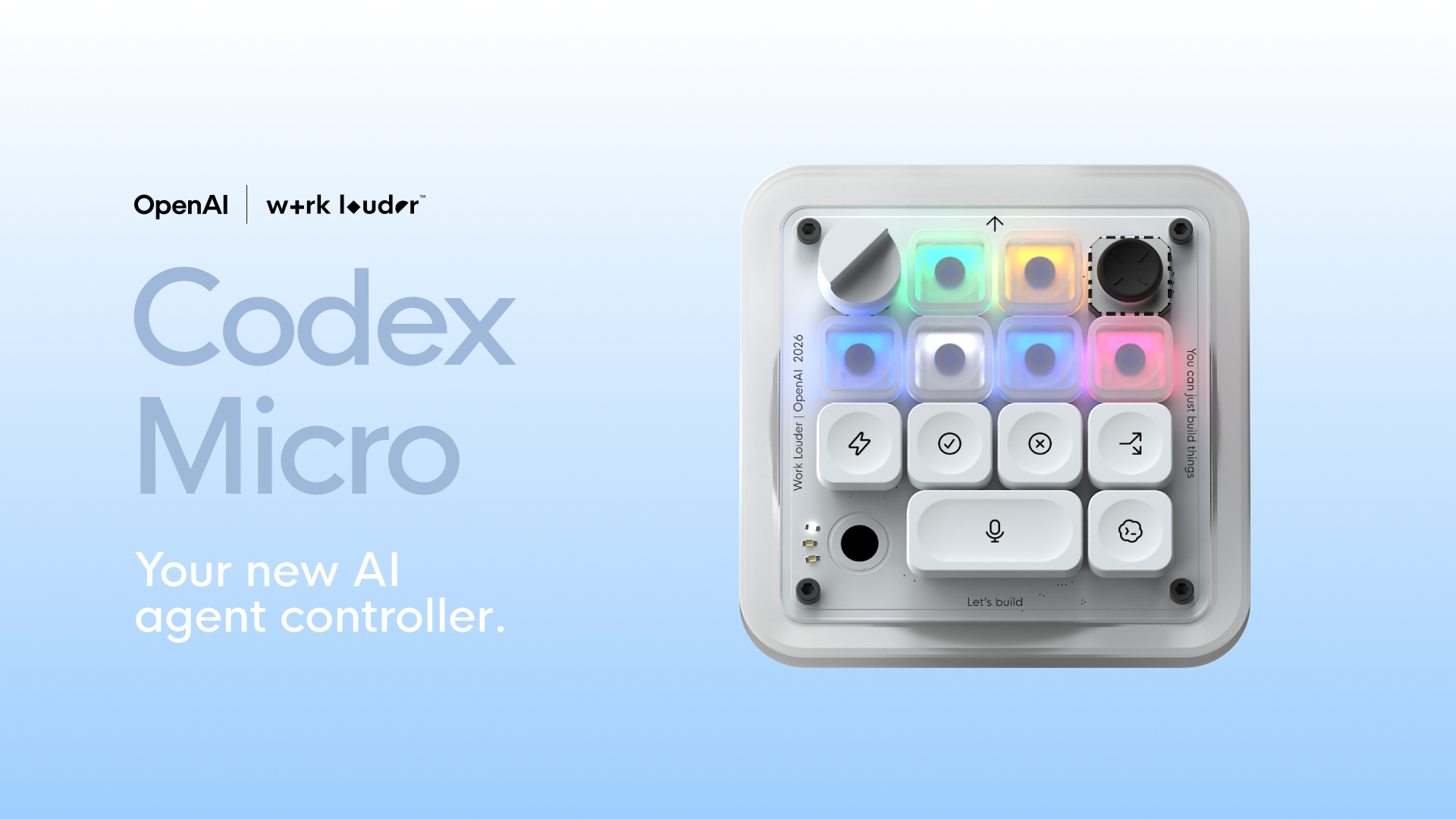
Codex Micro is a $230 programmable desktop control device from Work Louder, configured around OpenAI Codex workflows. Configuration runs through the company's Input software, which supports custom actions, multiple control layers, and software-linked layers that can switch when a selected application is in focus.
Codex Micro makes sense for someone who enjoys building a detailed control scheme around Codex. VibeKeys starts from a different place: put the common actions within easy reach, add voice and visible status, and keep the same hardware useful when the software changes.
Codex Micro vs VibeKeys Max at a Glance
For the closest like-for-like comparison, the table below focuses on VibeKeys Max, the screen-equipped model with Codex status integration and remote agent control.
| Comparison point | Codex Micro | VibeKeys Max |
|---|---|---|
| Core positioning | Programmable control device configured around Codex | AI-agent control keypad with status display and remote operation |
| Current pricing | $230 | $99 |
| Availability | Available to order | Available to order with free worldwide shipping |
| AI tool flexibility | Codex-centered | Profiles or setup guidance for Codex, Claude Code, Gemini CLI, Cursor, OpenCode, and more |
| Physical input | Custom actions and layered controls through Work Louder Input | Six remappable keys, a pressable navigation knob, and a dedicated voice-input key |
| Voice workflow | Programmable actions and control layers | Dedicated key can toggle supported voice-typing tools |
| Agent status | Codex-centered layered controls | Max displays live Codex status with the VibeKeys CLI and Codex plugin |
| Away-from-desk use | Primarily a desktop control workflow | Max supports Wi-Fi remote control through Vibetty |
| Connectivity | Desktop control workflow | Bluetooth and Wi-Fi |
| Best fit | Codex-first users who prioritize layered programmability | Developers who want voice input, live agent status, remote control, or multi-agent flexibility |
Why VibeKeys Is a Practical Codex Micro Alternative
1. One keypad can follow you across AI coding tools
VibeKeys is designed for developers who do not want their physical controls tied to a single AI vendor. It supports Codex, Claude Code, Gemini CLI, Cursor, OpenCode, and other AI coding tools through profiles or customizable mappings. That flexibility matters when one project works best in Codex while another is already built around a different terminal agent or editor.
The integrations are not identical, nor do they need to be. The important part is that you can remap the keys and knob when your workflow changes instead of replacing the hardware with it.
2. The full VibeKeys range costs $29 to $99
VibeKeys Pro costs $29, Plus costs $49, and Max costs $99. That is a useful spread rather than a cosmetic choice between editions: buy the small wired pad, pay a little more to lose the cable, or choose the screen-equipped model for remote agent work. Every model includes free worldwide shipping.
You do not need the top model to get customizable keys, a knob, and voice input. Max is there for the people who want the fuller control-deck experience; everyone else can spend less without losing the basics.
3. Voice input handles the part macro keys cannot
Many AI coding tasks begin with a sentence, not a shortcut. The dedicated microphone key can toggle voice-typing tools such as Typeless or Wispr Flow, so you can dictate a prompt or correction and leave the main keyboard free for code.
Voice input will not replace careful review, and it depends on the speech tool you configure. Still, it expands the keypad beyond accept/reject shortcuts and makes it more useful for prompt-heavy work.
4. VibeKeys Max makes Codex status visible
VibeKeys Max displays real-time Codex activity on its screen in keyboard mode. The integration uses the VibeKeys CLI and a Codex plugin to show when Codex is working, finished, or waiting for input.
There is some setup involved; this is not a zero-configuration USB shortcut pad. Once it is connected, though, a glance at the screen can be more useful during a long task than another row of generic macro keys.
5. VibeKeys Max keeps working when you leave the desk
VibeKeys Max adds Wi-Fi-based remote control through the open-source Vibetty server. It is intended for checking and steering a coding-agent session from elsewhere in the room rather than remaining attached to the main keyboard.
Remote mode introduces software configuration and network considerations, so it is best for users who genuinely want an away-from-desk workflow. The advantage is choice: buy Max for that workflow, or choose Pro when a small wired keypad is all you need.
6. VibeKeys is available now in three clearly differentiated models
Pro and Plus are in stock, while Max is manufactured before shipping. More importantly, you are not waiting for one device configuration to suit everyone: there is a simple wired model, a wireless model, and a screen-equipped remote controller.
That makes VibeKeys easy to try without closing off an upgrade later if your agent workflow becomes more demanding.
Where Codex Micro May Still Be the Better Choice
VibeKeys is not automatically the better product for everyone. Codex Micro makes more sense if Codex is your primary environment and you specifically want the layered programmability offered through Work Louder Input. App-linked layers can be useful for people who enjoy building detailed, application-specific control maps.
There is also a difference in product philosophy. Codex Micro emphasizes a configurable desktop control surface. VibeKeys concentrates on a smaller set of frequent AI-coding actions, then adds voice input, multi-tool profiles, and—on Max—status and remote control. For most developers, those workflow-level capabilities are the more practical distinction.
Which VibeKeys Model Should You Choose?
Choose VibeKeys Pro for an inexpensive wired keypad
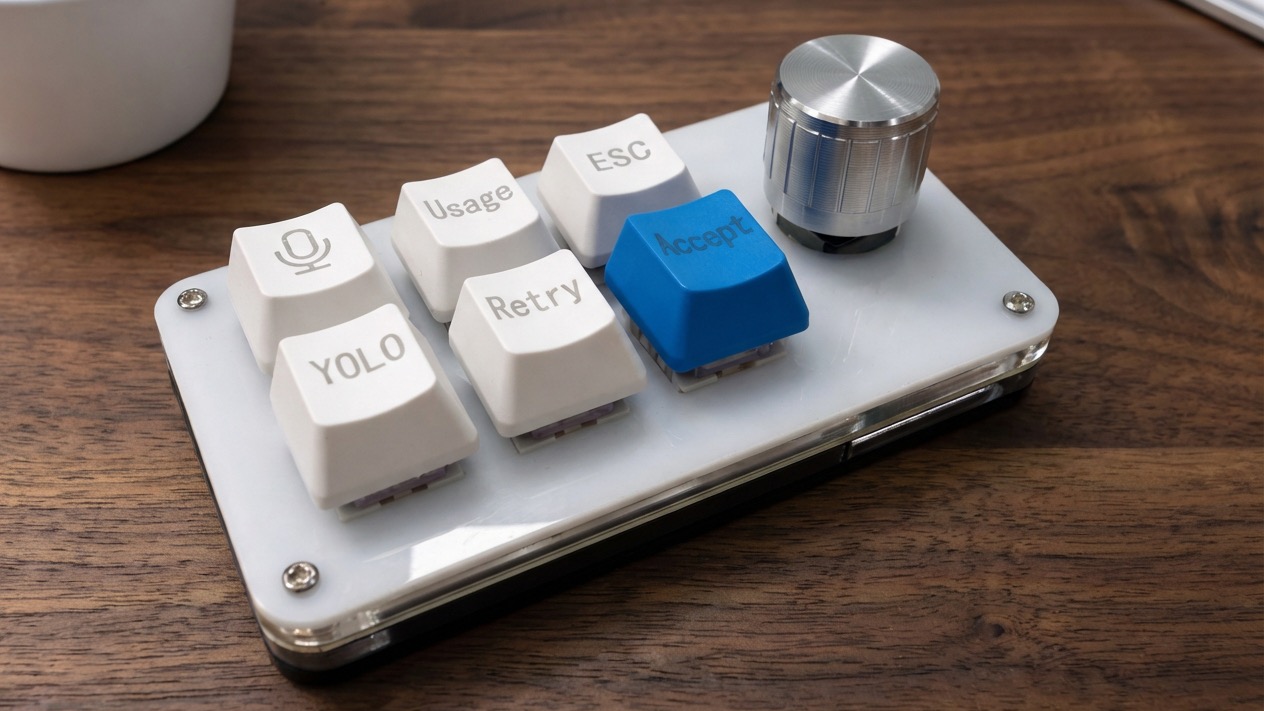
Pro is the straightforward entry point. It uses USB-C and includes six customizable keys, voice input, and a navigation knob. It is best for a fixed desk where low cost and simple connectivity matter most.
Choose VibeKeys Plus for wireless keyboard-mode use
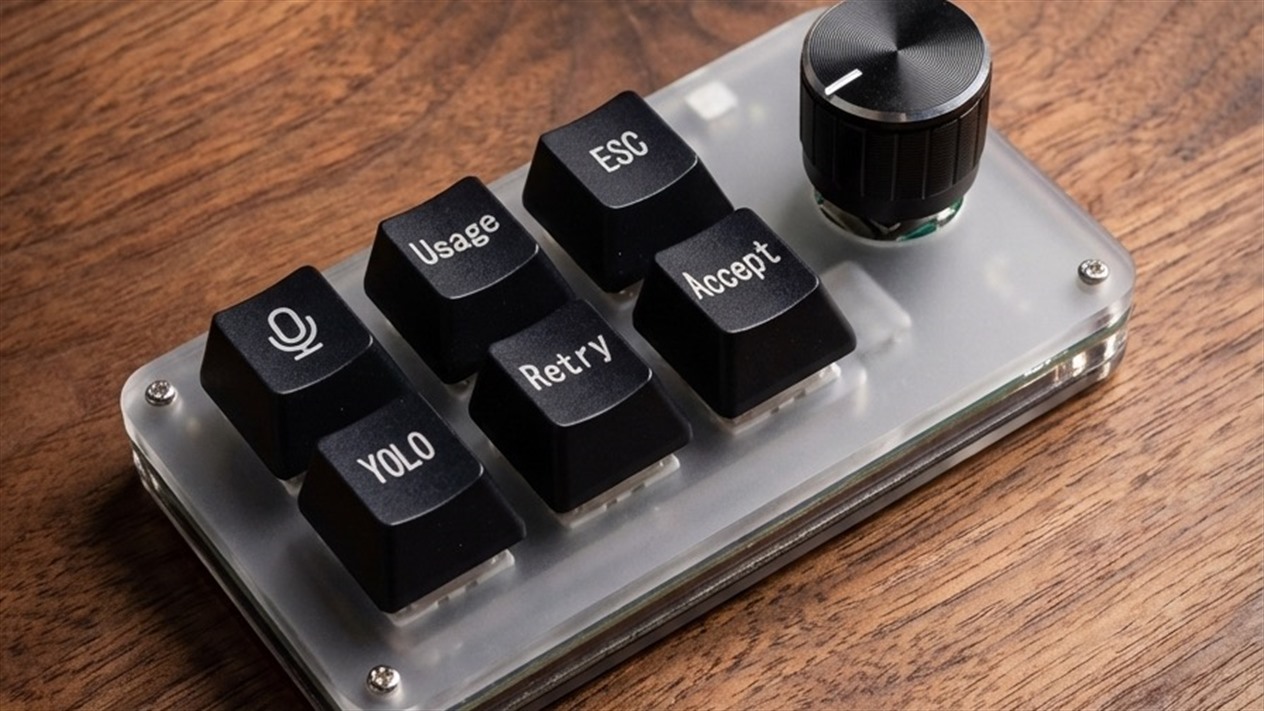
Plus builds on Pro with Bluetooth and Wi-Fi and provides up to 15 days of battery life. It suits users who want fewer cables but do not need the Max status screen and remote-agent workflow.
Choose VibeKeys Max for Codex status and remote control
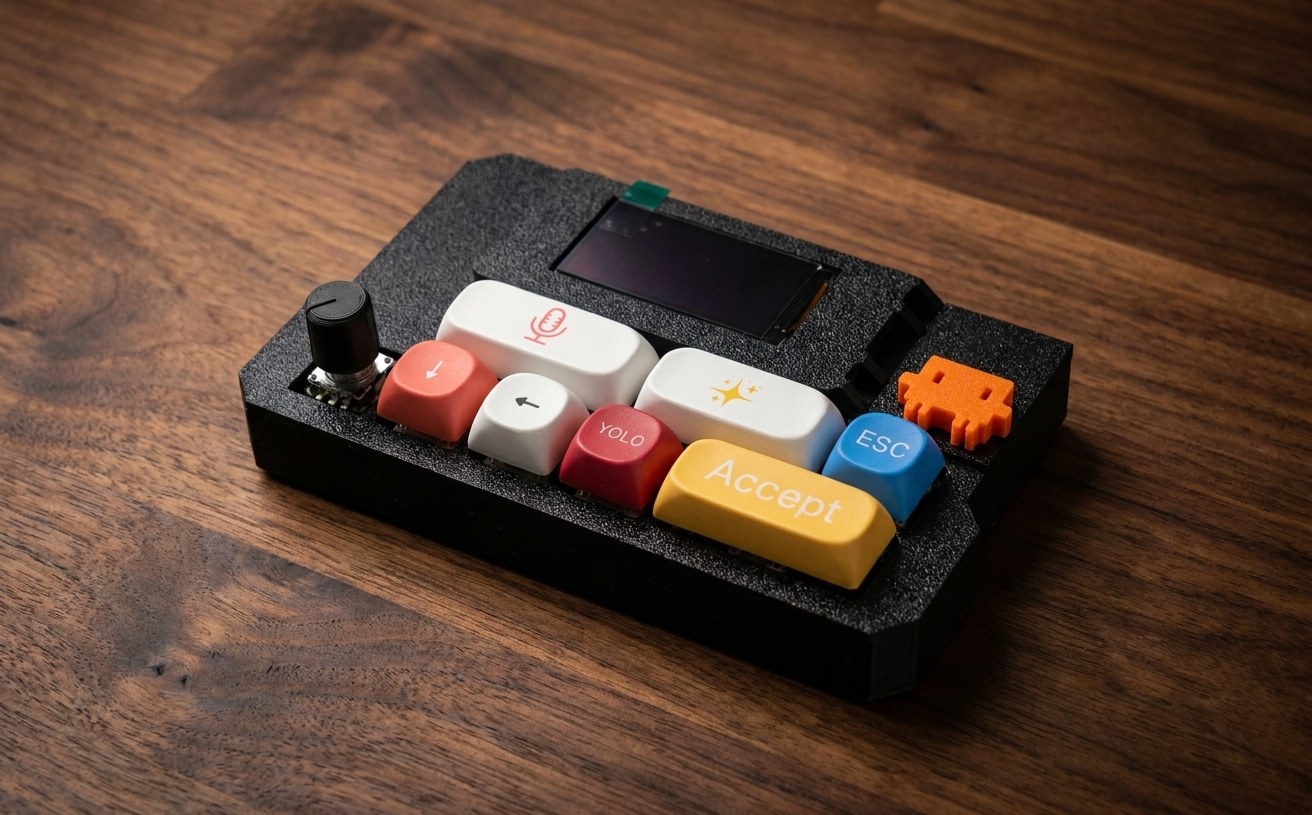
Max is the closest match to the “control deck” side of the Codex Micro concept. It adds a screen, Bluetooth, Wi-Fi, Codex status integration, and remote operation through Vibetty. It costs more and takes more setup, but it covers the broadest AI-agent workflow.
How to Decide in Five Minutes
If you are still undecided, use this shortcut:
- Pick Codex Micro if you mainly use Codex and want to build detailed control layers in Work Louder Input.
- Pick VibeKeys Pro if you want the least expensive wired route to programmable AI coding controls.
- Pick VibeKeys Plus if wireless use matters more than an onboard status display.
- Pick VibeKeys Max if you want Codex status, voice input, and remote agent control in one device.
- Pick VibeKeys for flexibility if you expect to switch between Codex, Claude Code, Gemini CLI, Cursor, or OpenCode.
Frequently Asked Questions
Is VibeKeys compatible with OpenAI Codex?
Yes. VibeKeys provides a Codex key profile, and VibeKeys Max displays Codex status through the VibeKeys CLI and Codex plugin.
Is VibeKeys cheaper than Codex Micro?
Yes. Codex Micro costs $230, while VibeKeys Pro, Plus, and Max cost $29, $49, and $99 respectively.
Can VibeKeys work with AI coding tools other than Codex?
Yes. VibeKeys works with Claude Code, Gemini CLI, Cursor, OpenCode, and other tools in addition to Codex. The exact mapping and integration depth vary by tool.
Does VibeKeys replace a full keyboard?
No. It is a companion keypad for repeated AI-agent actions, navigation, and voice input. You will still use a normal keyboard for coding and detailed text editing.
Which model is closest to a Codex control deck?
VibeKeys Max is the closest because it combines programmable controls with a status screen and remote-agent features. Pro and Plus are better understood as compact shortcut keypads.
Conclusion
For most AI-first developers, VibeKeys is the more versatile Codex Micro alternative. The price is lower, the hardware is not tied to one AI tool, and the features solve everyday annoyances: speaking a long prompt, checking whether Codex is finished, or steering a task without sitting at the desk. Codex Micro still suits people who want detailed Codex-centered layers. VibeKeys simply fits a wider range of working habits—and lets you start at $29.
Compare VibeKeys models and choose your AI coding keypad.