AI Agent Status Lights vs VibeBuddy: Is a Traffic Light Enough?

Short answer: a $30 USB status light wired to Claude Code hooks tells you that something changed, as long as you are looking at it. Even with a single agent, it can't tell you whether yellow means a permission prompt or a question, whether red means done or failed, and it can't reach you once you leave the desk. VibeBuddy ($69, for Mac and Windows) names the state, says it out loud, and stacks up to three tasks when you run more than one. If you only need a cheap "is it still running" signal, buy the light.
Updated November 11, 2026: VibeBuddy 0.6.2 added Windows 10 and 11 (x86_64). The platform comparison and the advice below now reflect that.
The tensest moment with an AI agent isn't hitting enter to start it. It's everything after you hand over the task.
Is it still running? Did it get stuck? Did it just ask for confirmation? You tell yourself you'll go make coffee, and then you keep glancing back at the terminal anyway.
A small traffic light on your desk fixes this in the simplest way possible: green means running, yellow means it needs you, red means the round is over. Agent status stops hiding inside a window and moves into your peripheral vision. That simple idea now has a whole product category behind it, from $30 USB busy lights to open-source agent lamps you can solder yourself.
Developers clearly want it. In a recent r/ClaudeAI thread, a developer wired an old Kuando Busylight to Claude Code hooks so it shows whether Claude is still working or waiting for an answer. The post drew more than a hundred comments, and the most popular reply compared it to the andon light on a factory floor. A few people running many sessions at once raised the catch: with enough agents, the light simply stays red.
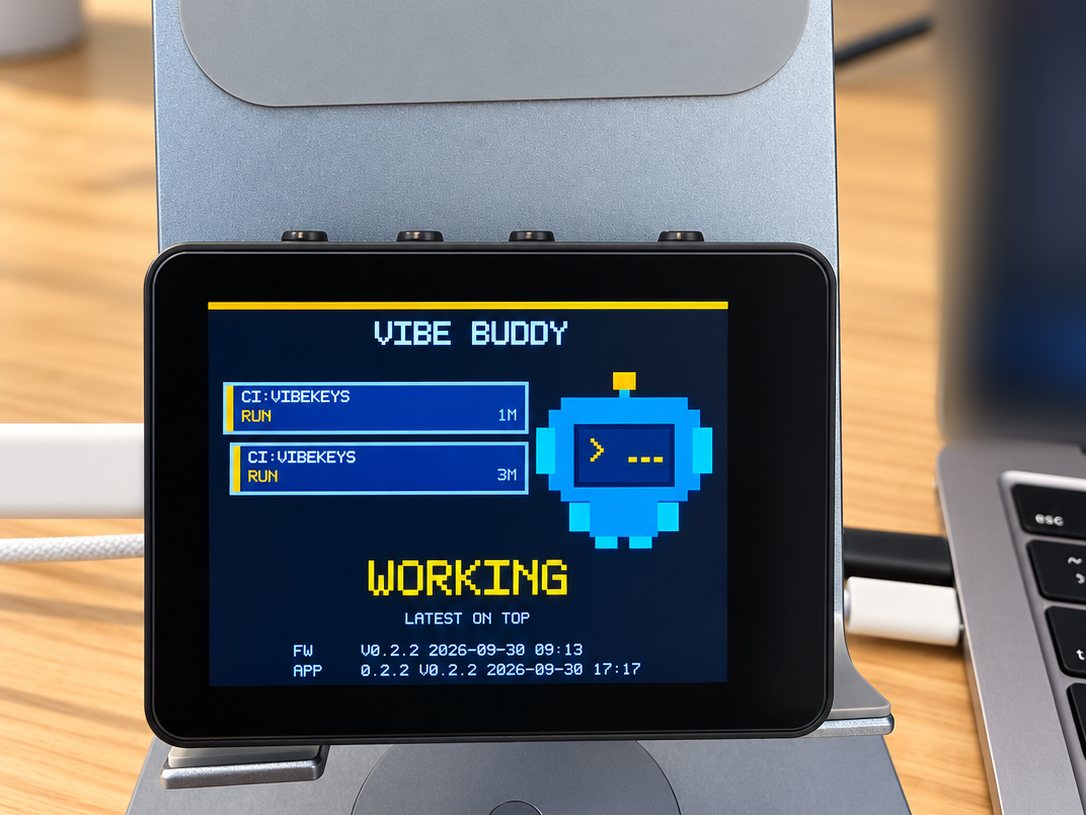
VibeBuddy takes the same idea one step further. Instead of only showing a color, it puts a task card on a small screen, plays an animation and says one short line out loud: which task changed, and whether you need to come back right now.
The category: traffic-light gadgets for AI agents
There is no single agent status light product; there is a family of them. The common thread is a physical light that maps agent state to a color, so you can read your build from across the room.
A few examples that define the category today:
- USB busy lights, such as the blink(1) mk3 ($29.95) or the Luxafor Flag (roughly $30 to $42). They were born as "do not disturb" lamps for calls and meetings, and agent workflows adopted them because a script can set any color over USB.
- Office busy lights with sound, such as the Kuando Busylight line (about $50 to $55 list price), which add ringtones and speaker alerts.
- DIY builds, from Arduino traffic-light modules wired to Claude Code hooks to ESP32 lamps on a desk. Cheapest option in the category, if you enjoy the soldering.
Even free software gets in on the idea. Community projects like Agent Beacon, a Windows desktop app that paints a pixel-art traffic light for TRAE, Codex and Claude Code, show how strongly people want this signal. The catch with on-screen lights is the one thing hardware solves: a window can still cover them.
Wiring any of these to Claude Code takes two hooks. A Notification hook fires when Claude needs your permission or has been waiting on you for about a minute, and a Stop hook fires when it finishes a turn. Point each one at the command that sets your light's color, and the lamp follows the session.
What a single color gets right
Before arguing for more, it's worth saying what the traffic-light approach does well, because it does a lot.
It is glanceable. Agent logs scroll for pages, but you usually care about three things only: still running, needs me, or finished. Red-yellow-green answers exactly that, with no learning curve.
It is hard to ignore. The light sits on your desk, in your peripheral vision. No window can cover it, no notification stack can swallow it, and it doesn't compete with the forty other pings on your phone.
It is cheap and everywhere. A USB busy light costs between $30 and $55, works on Windows, macOS and Linux today, and takes almost no desk space. If all you want is the quietest possible "is it still running" signal, this is a genuinely good answer.
The ceiling shows up sooner than you'd expect, even with one agent.
Where a single color hits its ceiling
These first three apply even when you run a single agent:
It can't say why. Yellow might mean a permission request, a question, or an error, depending on how you wired the hooks. Done and failed often share a color, or differ by a blink pattern you have to memorize. With one agent you still walk back to the terminal to find out which.
It only works while you can see it. A light is a visual signal. Step into the kitchen or turn to a whiteboard and it changes color for nobody.
It ends at the alert. The light tells you to come back; it can't help you answer once you're there.
And these get worse as soon as you run more than one:
It can't say which task changed. One shared light across three running agents can only tell you "something happened". You still walk back to the desk to find out what.
It can't carry context. A color has no room for the session name, how long the task has been running, or whether the CI job or the local agent is the one waiting.
None of this makes status lights bad. It makes them a signal, not a companion.
What VibeBuddy does differently
VibeBuddy keeps the traffic-light immediacy and adds the minimum context a desktop alert needs.
It names the task and the reason
Each event becomes a task card: the agent type (CC for Claude Code, CX for Codex, CI for GitHub Actions), the session name, the current state and how long it has been in it. Under the cards, one large line says the thing that matters: INPUT REQUIRED, WORKING, DONE or FAILED, backed by an animation and a short spoken line.

You don't see yellow and then guess whether it wants permissions, wants input, or hit an error. It tells you.
Three agents at once, newest on top
VibeBuddy shows up to three task cards at the same time, newest first, each with its own elapsed time. With Claude Code refactoring one project, Codex writing tests in another and a CI run in flight, you can see which one to handle first without touching the keyboard.

You can act on the alert
This is the part no status light in the category offers. When a card says input required, press K2 on top of the box and the most recent session, the card on top, comes to the front. Paired with a VibeKeys keypad, the loop closes at the desk: Accept, Retry, YOLO or ESC, or press the Voice key and answer out loud. A long press on K2 mutes the speaker when you need quiet.
It watches things that aren't on your desk
Besides Claude Code and Codex hooks, VibeBuddy reads your GitHub Actions runs through the gh CLI you are already signed in to. And anything that can make an HTTP request can put a card on the screen:
curl -H 'content-type: application/json' \
  --data '{"version":1,"event":"task.done","title":"Hello"}' \
  http://127.0.0.1:7331/v1/events
So the same box can alert you about local agents, remote builds, tests and deploys.
It is useful when nothing is running
Between tasks, the screen shows what got done today. Press K1 and it becomes a Pomodoro focus timer. You can pick who the buddy is, in English or Chinese, and set the volume on the box itself.
The privacy and cable story
One USB-C cable carries power and events. No Wi-Fi, no battery, no cloud account. The Claude Code and Codex hooks forward session and turn IDs, event names and the working directory only; never prompts, replies, transcripts or tool results.
Status light vs VibeBuddy: head-to-head
| Dimension | Traffic-light status light (category) | VibeBuddy |
|---|---|---|
| Typical price | $30 to $55; DIY builds cheaper | $69, free worldwide shipping |
| What it shows | One color, sometimes a blink pattern | Task card with agent, session, state and elapsed time, plus a large status word and a spoken line |
| Done vs failed vs waiting | Often the same color, or a pattern to memorize | Separate DONE, FAILED and INPUT REQUIRED states |
| Multiple agents | One shared light means "something changed" | Up to three task cards, newest on top |
| Away from the desk | Only works while you can see it | Says a short line out loud; long-press K2 to mute |
| Acting on the alert | None; you walk to the keyboard | K2 brings the most recent session to the front; VibeKeys adds Accept, Retry, YOLO, ESC and voice |
| Platforms today | USB lights work on Windows, macOS and Linux | Apple silicon Mac on macOS 14 or later, Windows 10 and 11 (x86_64, app v0.6.2 or later), x86_64 Linux experimental |
| Connection | USB, or serial and Wi-Fi on DIY builds | One USB-C cable, no Wi-Fi, no battery |
| Integrations | Vendor SDKs and REST APIs; IFTTT or Home Assistant on some | Claude Code, Codex, GitHub Actions, plus open HTTP events |
| Open source | Some, including blink(1) | GPL-3.0 firmware, app, hooks and hardware notes on GitHub |
| Privacy | Depends on the vendor and any cloud service | Local hooks; status metadata only |
| Best for | The cheapest possible "is it alive" signal | Knowing what happened and whether to come back, with one agent or several |
Prices checked in November 2026 from vendor stores; they change, so treat them as a rough band rather than a quote.
Which should you pick?
Pick a traffic-light status light if:
- your budget is under $40 and a plain "still running" signal is all you need;
- you work on an Intel Mac, or you want full support on Linux today;
- you want the quietest, smallest possible device and nothing else on the desk;
- you enjoy wiring hooks to a blink(1) or building your own ESP32 lamp.
Pick VibeBuddy if:
- you need to tell "done" from "failed" from "waiting on you" without opening a terminal, even for one agent;
- you run Claude Code, Codex or GitHub Actions in parallel, or plan to;
- you step away from the desk but can't afford to miss the moment an agent needs you;
- you want to act from the desk, with K2 and a VibeKeys keypad, instead of walking back every time;
- you already like the idea of a desk companion for your agents rather than another indicator lamp.
One honest caveat: VibeBuddy needs an Apple silicon Mac on macOS 14 or later, or a PC with Windows 10 or 11 (x86_64). x86_64 Linux is an experimental option, and on Windows voice commands and character previews aren't available yet. It also costs more than a busy light and takes more desk space. That is the price of an alert that explains itself.
FAQ
How do I know when Claude Code needs my input?
By default, Claude Code shows a desktop notification in iTerm2, Ghostty and Kitty; most other terminals stay silent. You can set preferredNotifChannel to terminal_bell for a beep, or add Notification and Stop hooks that play a sound, light a lamp or ping a device. On a claude.ai plan, Remote Control with push notifications turned on in /config can alert your phone too. A status light or VibeBuddy moves the signal off the screen and onto your desk.
Is a traffic light enough for Claude Code or Codex?
It is enough to answer "is it still working", and it answers that instantly. It is not enough to tell finished from failed from blocked on a permission, even with one agent, and it can't reach you once you leave the desk. With two or three agents it also can't say which one changed.
Do USB busy lights work on Windows?
Most do. blink(1), Luxafor and Kuando all ship Windows support. So does VibeBuddy: since v0.6.2 it runs on Windows 10 and 11 (x86_64) as well as Apple silicon Macs, with x86_64 Linux as an experimental option.
How much does VibeBuddy cost compared to a status light?
Status lights in this category run from about $30 to $55, and DIY builds less. VibeBuddy is $69 with free worldwide shipping. You can return or exchange it within 30 days of delivery: we cover return shipping for defects or shipping damage, and for any other reason you pay return shipping to our US or Singapore address. See the return policy.
Does VibeBuddy read my prompts or my code?
No. The hooks forward session and turn IDs, event names and the working directory. Prompts, assistant replies, transcripts and tool results never leave your machine, and nothing goes through a cloud service.
Can I build my own instead?
Yes, in both camps. The category has open hardware like blink(1), and VibeBuddy is open source under GPL-3.0: the ESP32 firmware, the apps, the hooks and the hardware notes are on GitHub, so you can build and flash your own for free.
Verdict: a color tells you something changed, VibeBuddy tells you what
Traffic-light status lights earned their place by making agent state visible at a glance. Cheap, quiet, impossible to bury: if a "still running" signal is all you need, they are a genuinely good answer, and the open-source ones are a fun weekend build.
VibeBuddy keeps that immediacy and adds the context a color can't carry: which task, which state, how long, and whether you should come back now. Then it goes one step further than any light in the category, by letting you answer from the desk instead of walking back to the terminal.
If a glance at a color is all you need, buy the light. If you want to know what happened without walking back, whether you run one agent or three, see what VibeBuddy adds, and follow the setup guide when it arrives.
Order VibeBuddy → $69, free worldwide shipping, ships within 3 business days.